The short answer: use a tool with time-stretching (not raw playback-speed control). Time-stretching separates tempo from pitch, so you can play a song at 60% speed and every note stays in the original key. Almost every modern practice app, audio editor, and even most video platforms can do it — the quality difference is in how they do it.
If you've ever dragged a tape or a turntable slower, you know the old problem: slow it down and everything drops in pitch too. A guitar solo in A minor becomes a solo in a key that doesn't exist, and you can't play along. Modern time-stretching fixes exactly this.
Here's what's actually happening, which tools do it well, and — the part most guides skip — how to use it so you actually learn the part instead of just listening slowly.
Why does slowing a song down normally change the pitch?
Because pitch and tempo are the same thing in a raw recording. Audio is a wave; pitch is how fast that wave oscillates. Play the recording at half speed and every oscillation halves too — the tempo drops an octave and so does the pitch. That's physics, not a bug.
Time-stretching breaks that link. Instead of playing the wave slower, the algorithm chops the audio into tiny overlapping windows and repeats or spaces them out to fill more time, while each window keeps its original oscillation rate. Tempo changes; pitch doesn't. The classic approach is a phase vocoder; modern tools add transient detection so drums stay punchy instead of smearing.
This is why quality varies. Stretch too far and you hear artifacts: a metallic "phasey" sound, or smeared drum hits. Which brings us to the practical limit.
How far can you slow a song down before it sounds bad?
Rule of thumb: 75–85% is transparent, 50–65% is usable, below 40% gets ugly.
| Speed | What it sounds like | Good for |
|---|---|---|
| 90–100% | Indistinguishable | Final run-throughs |
| 75–85% | Very clean, slight softening | Most practice |
| 50–65% | Audible artifacts, still clear | Learning fast passages |
| 25–40% | Metallic, smeared transients | Last resort — transcribing single notes |
Dense, cymbal-heavy mixes degrade fastest (transients everywhere). A solo instrument stretches much more gracefully. Tip: if you need to go below 50%, separate the stem first and stretch that — one isolated guitar track survives extreme stretching far better than a full mix.
How do you slow down a song without changing pitch?
The fastest free option: a video platform
Major video platforms have a playback-speed setting (usually under the ⚙️ menu) that drops to 0.5× while preserving pitch. Zero setup, and it works on anything already uploaded there.
Limits: fixed steps (0.25/0.5/0.75), no A/B looping, no isolating instruments, and you're at the mercy of whatever version someone uploaded. Good for a quick listen; poor for real drilling.
In a DAW
Import the file and use the built-in time-stretch — every major DAW has one. This is the highest ceiling for quality and control, since you can usually pick a stretch algorithm to match the material (one mode for full mixes, another tuned for drums).
Limits: heavy for practice. Launching a DAW to loop eight bars is friction, and you're paying for a production tool you'll use 5% of.
Dedicated practice apps
This is the category built for the job. You get tempo control plus the things that actually matter for practice — looping a section, isolating or muting an instrument, and chords on screen. Most are cloud-based (you upload your track); a few run on-device.
VoxoMix note (our app, so judge accordingly): tempo and pitch are independent sliders, it runs entirely on your own computer with no upload, and because it also does stem separation you can mute the guitar and slow the rest in the same window:
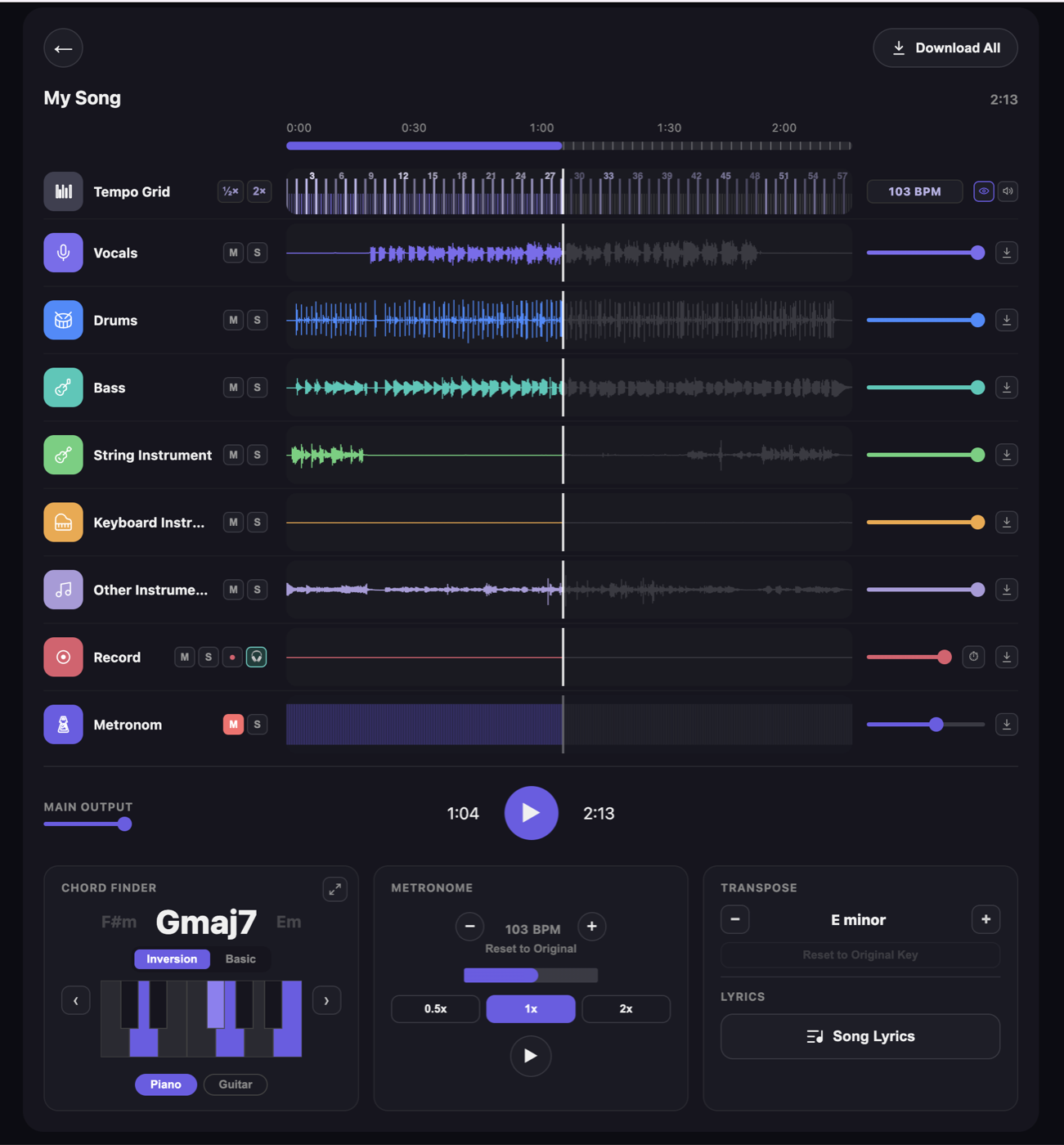
The speed control (0.5×/1×/2×) and the transpose panel are separate — that's the whole point. Slow the tempo, and the key stays put. Runs on Mac and Windows; free tier available.
How to actually practise with a slowed-down song
This is where most people waste the feature. Slowing a song down isn't practice — it's what makes practice possible. The method:
- Find the smallest unit that's broken. Not "the solo" — the two beats you fumble. Loop that.
- Drop to the speed where you can play it perfectly. Not "almost." Perfectly. If that's 50%, it's 50%. Playing it wrong faster just rehearses the mistake.
- Play it clean five times in a row. Miss one, restart the count. This is the part that works and the part everyone skips.
- Raise the tempo ~5%. Repeat step 3. If you break down, drop back 5% — you went too early.
- Isolate when you're stuck. Mute the instrument you're learning and play its part against the rest of the band. Nothing exposes bad timing faster than being the only guitar in the room.
- Record it and listen back. This step is the most brutal and the most useful. You cannot hear yourself accurately while playing — your attention is on your hands. Play the take back and you'll hear exactly where it falls apart, with no argument. In VoxoMix you do this on a record channel inside the song: play your part in place of the stem you muted (monitoring on, so you hear yourself in the headphones), then listen to it against the rest of the band. Record a take slow, record one at 100%, compare the two — that's where you actually hear the progress. Export the take as WAV if you want to keep it.
- Finish at 100%, once. Ending a session at full speed cements it.
The "5% ladder" is slow on day one and startling by day four. Musicians who climb it deliberately outpace people grinding at full speed every time.
Frequently asked questions
Can you slow down a song without changing pitch for free?
Yes. Video platforms preserve pitch at 0.25–0.75× playback speed. Free, open-source audio editors have a "change tempo" effect that leaves pitch alone. Several practice apps, VoxoMix included, offer free tiers with tempo control.
Does slowing a song down reduce the audio quality?
Time-stretching introduces artifacts that grow with the amount of stretch. Above ~75% speed most listeners hear nothing. Below ~50% you'll notice a metallic or smeared quality, especially on drums and cymbals. The original file is never modified — stretching happens at playback.
What's the difference between playback speed and time-stretching?
Playback speed changes tempo and pitch together (like a slowed tape). Time-stretching changes tempo only, keeping the original key. For practising along with a song you always want time-stretching. Any modern practice app defaults to it.
Can I slow down a song and change the key separately?
Yes — they're independent controls in most practice tools, VoxoMix included. Slow the tempo to learn a fast run, or transpose the key to sing comfortably, or both at once.
How slow should I practise?
Slow enough to play it perfectly, which is usually slower than feels dignified. The reliable test: if you make the same mistake twice, you're too fast. Drop 10% and try again.
The bottom line
Time-stretching is solved technology — every serious tool has it. The variable that actually determines whether you learn the part is method: loop the smallest broken unit, play it perfectly five times, climb 5% at a time.
Pick whatever tool removes the friction between "I can't play this" and "loop it at 60%." If a video platform's speed setting does that for you, use it. If you want looping, stem isolation, and chords in one place without uploading your work, that's what we built VoxoMix for.
📘 Part of our complete guide: How to practise any song at home
About the author: Barış Demirel is a musician and the founder of VoxoMix, an offline AI music studio for practising musicians.
Sources
- Guitar Music Theory — Best software for slowing down music to practice guitar
- Guitar Music Theory — How to slow down music for guitar (plus loop and change pitch)
- GuitarHabits — Improve your playing through slow, thorough and full immersion
Download VoxoMix free and split your first song into stems right now.
Download Free