The short answer: most stem separation, chord detection, and lyrics tools are cloud services — you upload your song, their server processes it, you download the result. Offline (on-device) tools never upload anything. For a cover you're learning, that difference doesn't matter. For the song you wrote last week and haven't released yet, it's the whole calculation.
Disclosure: VoxoMix is our own app and it appears below. We've laid out what each category is genuinely good at, so you can pick what fits your workflow.
Why does offline processing matter for musicians?
Offline processing means your audio file never leaves your computer. There's no upload, so there's no copy of your song sitting on a third-party server — nothing to be breached, retained after you close your account, or swept into a dataset under terms you skim-read.
Let's be precise about the claim, because overstating it would be dishonest: going offline doesn't make your work impossible to copy. Anything on your hard drive can still be shared, and nothing stops someone recording your set. What it eliminates is a specific, real category of risk: server-side exposure. No upload means no server-side leak, no third-party retention, and no ambiguity about what happens to your chords, melodies, and lyrics after processing.
If you're a hobbyist learning covers, that risk is close to irrelevant — optimise for convenience instead. If you're sitting on unreleased original material, it's the entire point.
There's a second, less philosophical benefit: no queue. Cloud tools run on shared infrastructure, so busy periods mean waiting. On-device tools are limited by your own processor and nothing else.
What does an offline all-in-one practice studio look like?
The reason most musicians pay for a cloud subscription isn't separation alone — it's everything stacked on top: chords, tempo, transpose, lyrics, metronome. Here's that entire stack running locally:
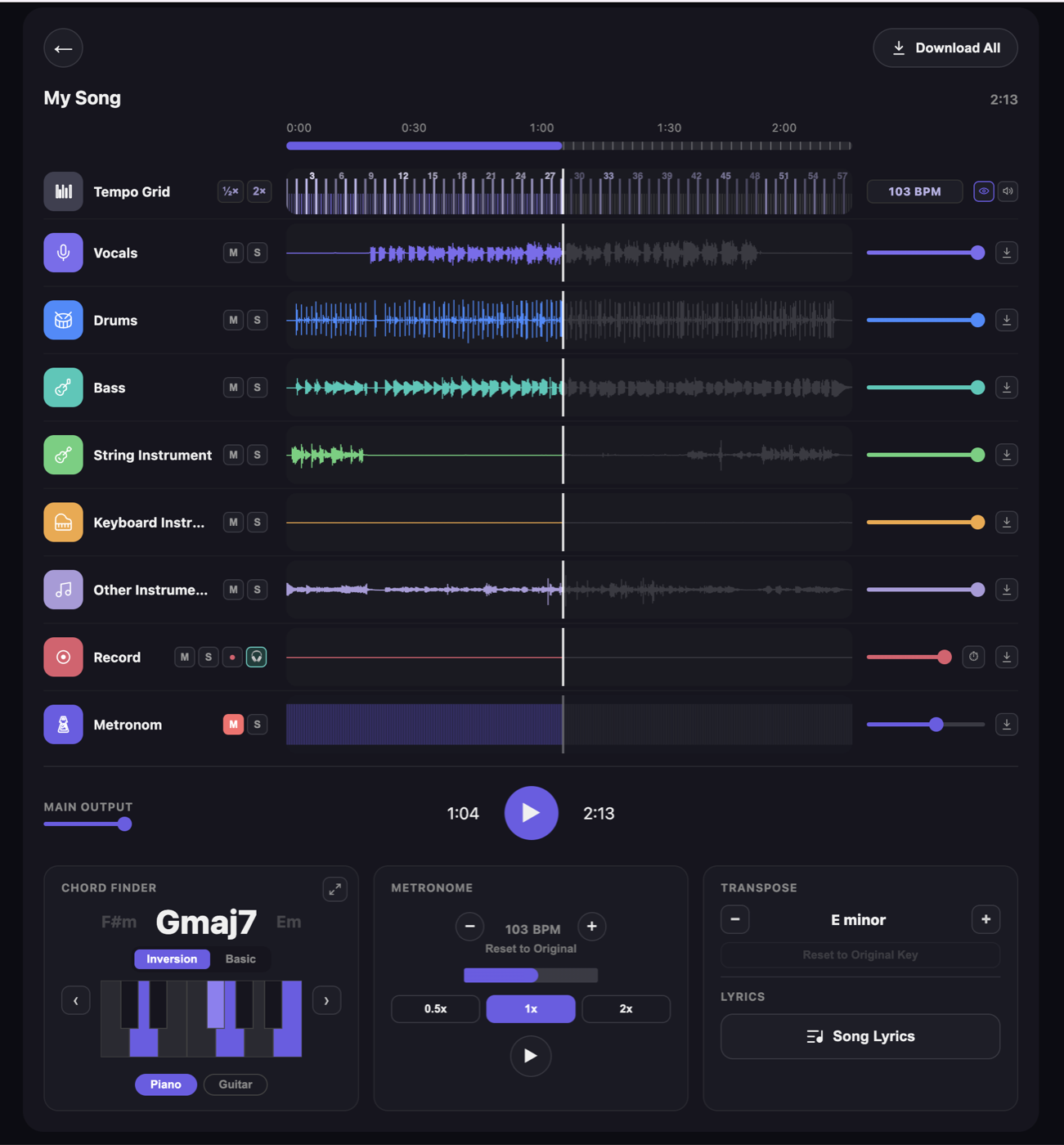
Every element in that window matters for practice:
- Six separated stems — vocals, drums, bass, string, keyboard, other — each with Mute and Solo. Mute the guitar and the song becomes your backing track.
- A Record channel — record your own playing straight into the song, in place of the part you muted, then listen back. The headphone button turns on monitoring so you hear yourself as you play, and you can export the take as WAV if it's a keeper. This is where practice stops being "I think I can play it" and becomes "I heard the take, and I'm dragging in bar 9."
- Tempo grid + 0.5×/1×/2× speed — slow a passage down without the pitch dropping.
- Transpose — move the song to a key you can actually sing.
- Chord finder — chords detected from the audio, on piano or guitar.
- Lyrics — transcribed from the track.
- A metronome channel — locked to the song's own BPM.
- Per-stem download — export any layer, or all of them at once.
No upload happened to produce any of it. The file was read from disk and processed on the machine.
How good is offline chord detection?
Chord detection is rarer than separation — most separation tools don't attempt it at all. Offline detection reads the audio and gives you the chord with a playable shape:
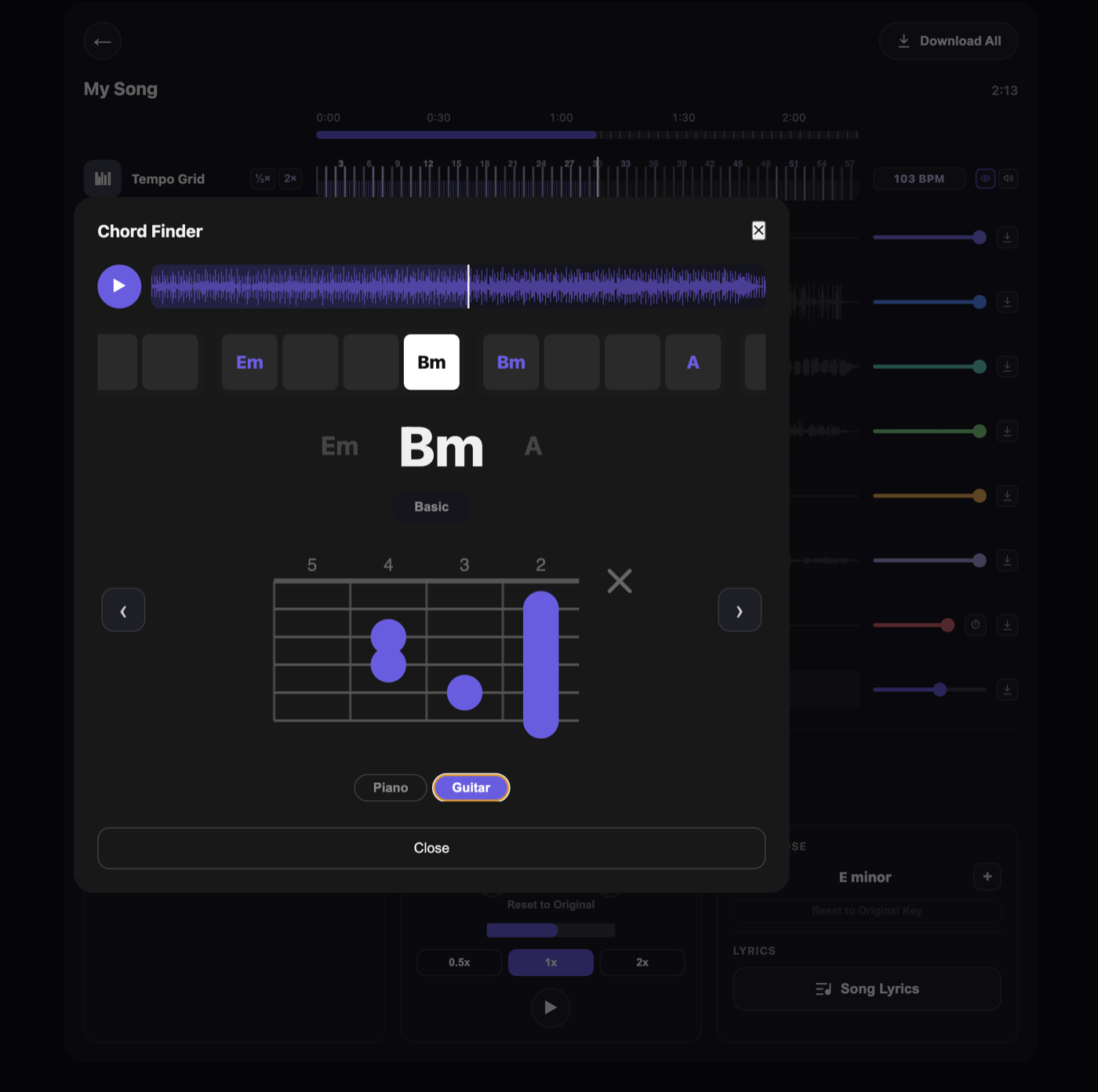
Two things there matter for learning. The chord timeline across the top shows what's coming, not just what's playing — you can see the change before you have to play it. And you get an actual fretboard shape: a barre chord arrives as finger positions rather than a name you'd have to go and look up. Toggle between piano and guitar depending on your instrument.
Honest caveat: no chord detection is perfect. Dense mixes, heavy distortion, and extended jazz voicings are where every detector — cloud or offline — gets less reliable. Treat detected chords as a very strong first draft, not gospel. Your ear is still the final judge.
VoxoMix vs the others: which one fits you?
Every category here is legitimate — they optimise for different musicians.
| VoxoMix | Cloud practice apps | Free offline separators | |
|---|---|---|---|
| Where your song is processed | On your machine | On their servers | On your machine |
| What it does | Separation + chords + lyrics + tempo + transpose + tuner + recording | Separation + chords + lyrics + tempo | Separation only |
| Where it runs | Mac and Windows desktop | Phone and web | Desktop |
| What it works with | Your own files | Your own files + a ready-made catalogue | Your own files |
| Internet | Not needed | Required | Not needed |
| Unreleased material | No server-side copy | Creates a copy you don't control | No server-side copy |
| Price | Free tier; $2.99–13.99/mo | Usually subscription | Free |
All three do real work:
- Cloud apps are strong for practising on a phone and pulling songs from a ready-made catalogue. If you're on the sofa playing well-known covers, that convenience is worth a lot.
- Free open-source separators compete with paid services on raw separation quality and cost nothing. A good starting point if stems are all you need; they don't include the practice layer (chords, lyrics, tempo, tuner), so you'd export stems and open something else.
- VoxoMix sits in the gap between those two: the full practice stack a cloud subscription gives you, without the upload, on your own computer. Free tier available; paid plans $2.99–$13.99/mo.
Which should you choose?
- You practise on your phone, using released songs → a cloud practice app. Nothing beats that mobile experience.
- You want free offline stems and you're comfortable with a technical workflow → a free, open-source offline separator.
- You want to browse a catalogue of chords without uploading anything → a catalogue-based cloud service.
- You want the full practice stack and won't upload unreleased work → VoxoMix (Mac and Windows).
Frequently asked questions
What is offline stem separation?
Offline stem separation splits a song into its parts — vocals, drums, bass, and instruments — using AI that runs entirely on your own computer. No internet connection and no upload are required, so the audio file never reaches a third-party server.
Is offline stem separation as good as cloud?
Yes. Separation quality depends on the AI model, not on where it runs. Modern on-device models are competitive with cloud services. The practical differences are elsewhere: cloud gives you mobile apps and catalogues; offline gives you privacy, no queue, and no internet requirement.
Is it safe to upload unreleased songs to cloud music tools?
Reputable services have real security practices, and for released or cover material the risk is low. But uploading creates a copy of your work on infrastructure you don't control, governed by terms that can change. If you're working on unreleased original material, on-device processing removes that category of risk — there's no server-side copy to leak or retain.
Can offline tools detect chords and lyrics too?
Some can. Most free offline separators only separate — no chords, no lyrics, no tempo control. VoxoMix does chord detection (piano and guitar), lyrics transcription, tempo and pitch control, and a tuner, all on-device.
Is there a free offline option?
Yes — there are excellent free, open-source offline separators, and they're a genuinely good choice if you only need stems. VoxoMix also has a free tier (2 songs/month) if you want the practice features too.
The bottom line
The question isn't "which tool is best." It's where your song gets processed, and that answer depends entirely on what you're working on.
Learning covers on your phone? Cloud is fine — use it. Sitting on a song you haven't released? Keep it on your machine. There's no server that can leak what was never uploaded.
📘 Part of our complete guide: How to practise any song at home
About the author: Barış Demirel is a musician and the founder of VoxoMix, an offline AI music studio for practising musicians.
Download VoxoMix free and split your first song into stems right now.
Download Free